
TLDR:
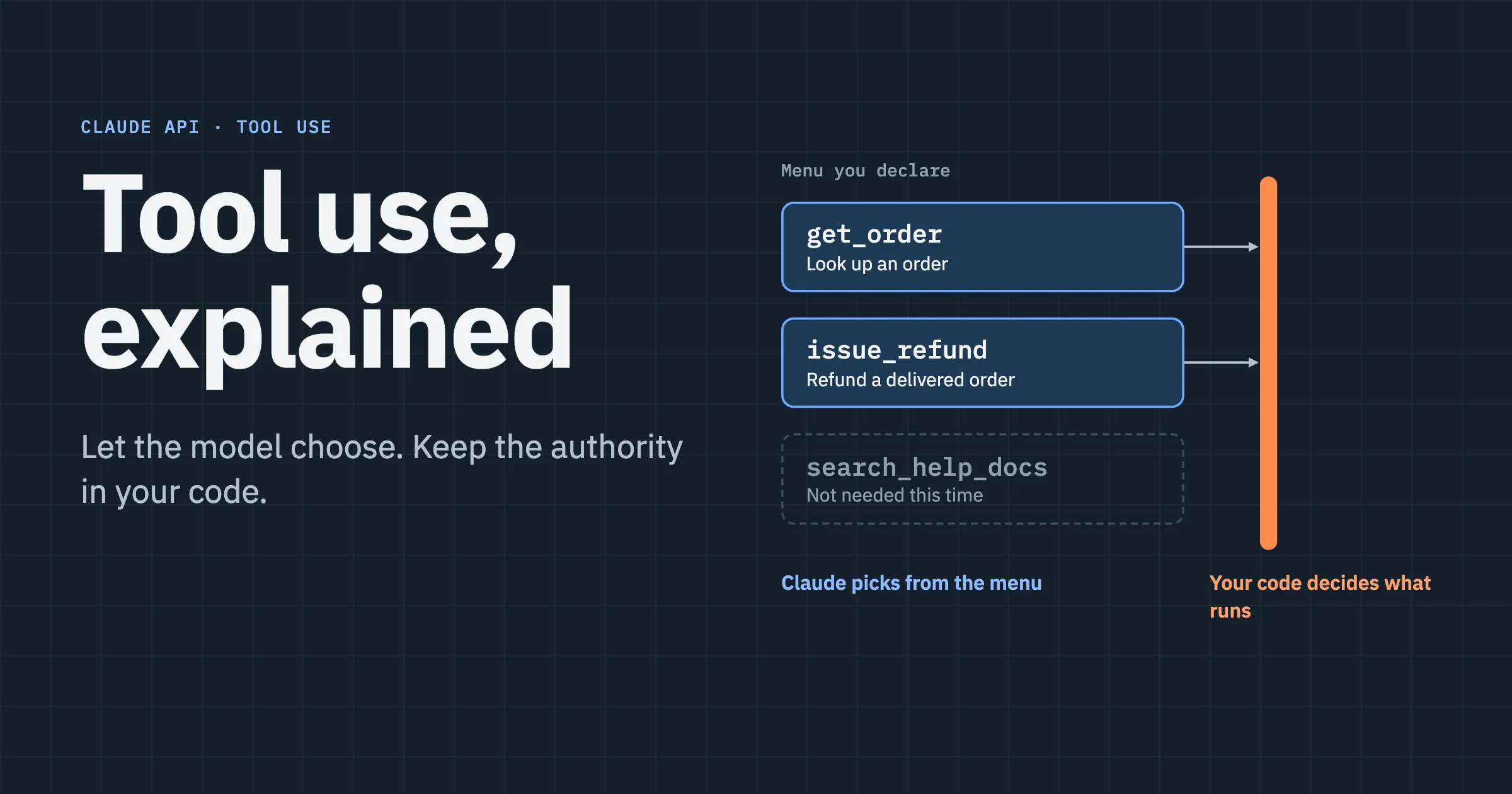
Tool use lets you hand Claude a menu of functions from your code. Claude decides which ones to call, with what data and in what order, then your code executes them and controls what is allowed.
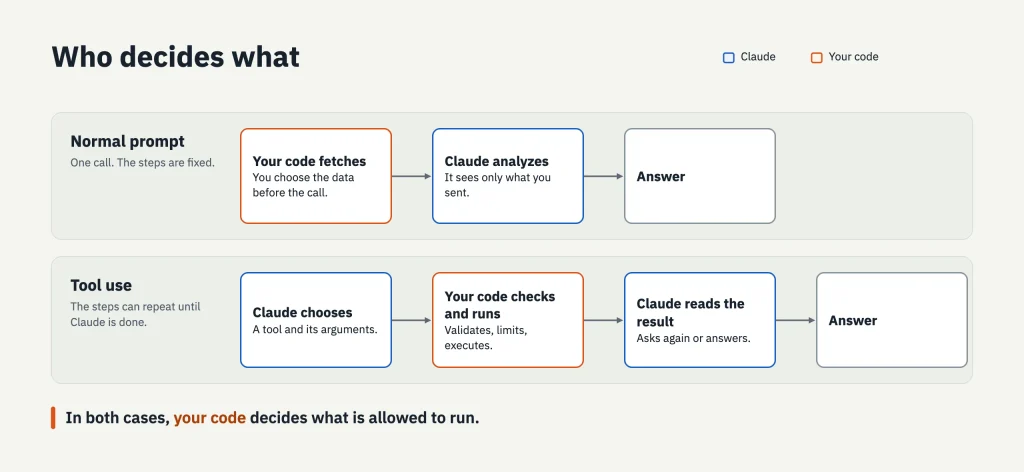
I know this sounds like a small API feature, but it changes who is in charge of what. In a normal prompt, you decide before calling the model which data it sees. With tool use, the model decides what it needs based on the user’s message and on what earlier calls returned. Your code still decides what is allowed.
This article walks through the loop, shows a runnable example, and gives my own rule of thumb for when the extra moving parts are worth it.
The Loop, in four moves
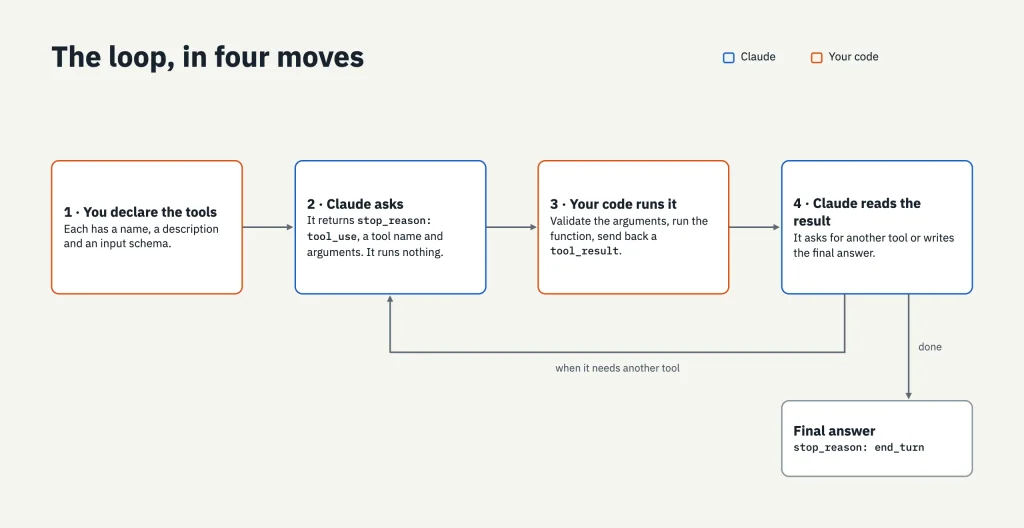
- You declare the tools. Each one has a name, a description, and an input schema (JSON Schema) that says what arguments it takes.
- Claude asks, but it does not execute. Given the user’s message, Claude replies with
stop_reason: "tool_use"and one or moretool_useblocks. Each block carries a tool name, a unique id, and the arguments; keep in mind that nothing has run yet. - Your code validates, runs and returns. You check the arguments, run the real function, and send the output back in a
tool_resultblock whosetool_use_idmatches the call. - Claude reads the result and decides again. It either asks for another tool or writes the final answer. When
stop_reasonis no longertool_use(usuallyend_turn), the loop is over.
Steps 2 and 4 repeat as many times as the task needs. This repetition is what separates tool use from a single request.
One scope note: this describes tools you define, which run inside your application. Anthropic also offers server tools such as web search, where Anthropic runs the call for you, and you never build a tool_result.
Ok, let’s see what actually changes compared to a normal prompt.
| Normal prompt | Tool use | |
|---|---|---|
| Who decides what data is fetched | You, before calling the model | The model, from the message and earlier results |
| How many steps happen | Fixed by your code | Decided at runtime |
| Who holds authority | Your code | Your code |
| In one sentence | “Take this data and analyze it” | “You have these functions; decide which ones you need” |
Authority does not move. The model can only choose among the functions you offered, and its arguments are untrusted input like any other. Validate them, cap them (page sizes, date ranges, row limits, etc.), and take the user’s identity from the session, never from a tool argument.
This is a design discipline, not something the API enforces for you. If you expose a run_sql(query) tool, you have handed the model a lot of authority. A narrow tool such as get_order(order_id) keeps the menu small and the checks easy.
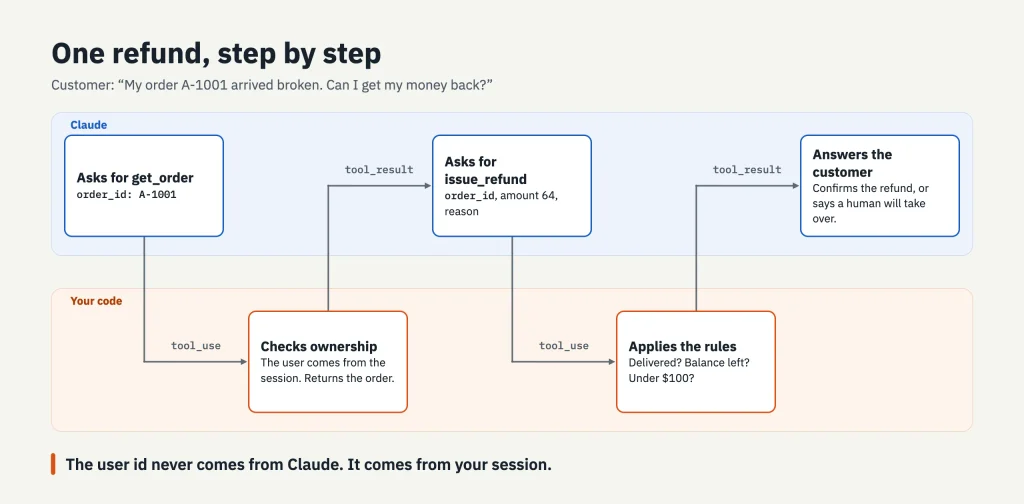
Just look at this example below: this is a small support assistant in TypeScript with two tools: get_order and issue_refund. The customer asks in plain language. Claude decides whether it needs to look up the order first, and whether a refund is even allowed. Every rule that matters is enforced in our code, not in the prompt.
import Anthropic from "@anthropic-ai/sdk";

export const client = new Anthropic(); // reads ANTHROPIC_API_KEY from the environment

const MODEL = "claude-sonnet-5-5";
const MAX_TURNS = 6; // hard cap on the loop: you own this limit, not the model
const MAX_REFUND_USD = 100; // anything above this goes to a human

// ---------------------------------------------------------------------------
// Fake data layer. Swap it for your database.
// ---------------------------------------------------------------------------
type Order = {
  id: string;
  userId: string;
  status: "shipped" | "delivered";
  totalUsd: number;
  refundedUsd: number;
};

const orders = new Map<string, Order>([
  ["A-1001", { id: "A-1001", userId: "u_42", status: "delivered", totalUsd: 64, refundedUsd: 0 }],
  ["A-1002", { id: "A-1002", userId: "u_42", status: "delivered", totalUsd: 250, refundedUsd: 0 }],
  ["A-1003", { id: "A-1003", userId: "u_42", status: "shipped", totalUsd: 40, refundedUsd: 0 }],
  ["B-2001", { id: "B-2001", userId: "u_99", status: "delivered", totalUsd: 30, refundedUsd: 0 }],
]);

// ---------------------------------------------------------------------------
// Move 1: you declare the tools (the menu Claude can choose from).
// ---------------------------------------------------------------------------
const tools: Anthropic.Tool[] = [
  {
    name: "get_order",
    description:
      "Look up one order that belongs to the current customer. Returns its status " +
      "(shipped or delivered), total in USD and the amount already refunded. " +
      "Use this before discussing or refunding any order. If the order does not " +
      "exist or does not belong to the current customer, it returns a 'not found' error.",
    input_schema: {
      type: "object",
      properties: {
        order_id: { type: "string", description: "Order id, for example A-1001." },
      },
      required: ["order_id"],
    },
  },
  {
    name: "issue_refund",
    description:
      "Refund part or all of a delivered order. Only delivered orders can be refunded, " +
      "the amount cannot exceed what is left unrefunded, and refunds above " +
      `$${MAX_REFUND_USD} are rejected and must be handled by a human agent. ` +
      "Call get_order first to confirm status and remaining amount.",
    input_schema: {
      type: "object",
      properties: {
        order_id: { type: "string", description: "Order id, for example A-1001." },
        amount_usd: { type: "number", description: "Amount to refund, in USD." },
        reason: { type: "string", description: "Short reason, as stated by the customer." },
      },
      required: ["order_id", "amount_usd", "reason"],
    },
  },
];

// ---------------------------------------------------------------------------
// Move 3: your code validates, executes and holds the authority.
// ---------------------------------------------------------------------------
type Session = { userId: string }; // comes from YOUR auth, never from the model

class ToolError extends Error {}

function str(value: unknown, field: string): string {
  if (typeof value !== "string" || value.length === 0 || value.length > 200) {
    throw new ToolError(`'${field}' must be a non-empty string.`);
  }
  return value;
}

function positive(value: unknown, field: string): number {
  if (typeof value !== "number" || !Number.isFinite(value) || value <= 0) {
    throw new ToolError(`'${field}' must be a positive number.`);
  }
  return value;
}

function ownedOrder(orderId: string, session: Session): Order {
  const order = orders.get(orderId);
  // Same message for "missing" and "someone else's": do not leak which ids exist.
  if (!order || order.userId !== session.userId) throw new ToolError("Order not found.");
  return order;
}

function runTool(name: string, input: unknown, session: Session): unknown {
  const args = (input ?? {}) as Record<string, unknown>;

  switch (name) {
    case "get_order": {
      const order = ownedOrder(str(args.order_id, "order_id"), session);
      return {
        order_id: order.id,
        status: order.status,
        total_usd: order.totalUsd,
        refunded_usd: order.refundedUsd,
      };
    }
    case "issue_refund": {
      const order = ownedOrder(str(args.order_id, "order_id"), session);
      const amount = positive(args.amount_usd, "amount_usd");
      str(args.reason, "reason");

      if (order.status !== "delivered") {
        throw new ToolError("Only delivered orders can be refunded.");
      }
      if (amount > order.totalUsd - order.refundedUsd) {
        throw new ToolError("Amount exceeds the unrefunded balance of the order.");
      }
      if (amount > MAX_REFUND_USD) {
        throw new ToolError(
          `Refunds above $${MAX_REFUND_USD} need a human agent. Tell the customer you are escalating.`,
        );
      }

      order.refundedUsd += amount; // the only line that changes anything
      return { order_id: order.id, refunded_usd: amount, status: "refund_issued" };
    }
    default:
      throw new ToolError(`Unknown tool: ${name}`);
  }
}

// ---------------------------------------------------------------------------
// Moves 2 and 4: the loop. Claude asks, your code answers, until Claude is done.
// ---------------------------------------------------------------------------
export async function answer(userMessage: string, session: Session): Promise<string> {
  const messages: Anthropic.MessageParam[] = [{ role: "user", content: userMessage }];

  for (let turn = 0; turn < MAX_TURNS; turn++) {
    const response = await client.messages.create({
      model: MODEL,
      max_tokens: 1024,
      system: "You are a support assistant for an online store. Be brief and honest.",
      tools,
      messages,
    });

    // Claude is done: collect the text of its final answer.
    if (response.stop_reason !== "tool_use") {
      return response.content
        .flatMap((block) => (block.type === "text" ? [block.text] : []))
        .join("\n");
    }

    // Claude asked for one or more tools. Keep its turn in the history...
    messages.push({ role: "assistant", content: response.content });

    // ...run each requested tool, and answer every tool_use with a tool_result.
    const results: Anthropic.ToolResultBlockParam[] = [];
    for (const block of response.content) {
      if (block.type !== "tool_use") continue;
      try {
        const output = runTool(block.name, block.input, session);
        results.push({
          type: "tool_result",
          tool_use_id: block.id,
          content: JSON.stringify(output),
        });
      } catch (error) {
        results.push({
          type: "tool_result",
          tool_use_id: block.id,
          content: error instanceof ToolError ? error.message : "Internal error.",
          is_error: true, // lets Claude adapt instead of guessing
        });
      }
    }
    messages.push({ role: "user", content: results });
  }

  throw new Error(`Gave up after ${MAX_TURNS} tool turns.`);
}Called as await answer("My order A-1001 arrived broken, can I get my money back?", { userId: "u_42" })The conversation looks like this. The message shapes are what the API uses; Claude’s exact choices will vary from run to run, so treat the sequence as illustrative.
| Step | Who | What travels |
|---|---|---|
| 1 | Customer | “My order A-1001 arrived broken, can I get my money back?” |
| 2 | Claude | tool_use get_order with { "order_id": "A-1001" }, stop_reason: "tool_use" |
| 3 | Your code | tool_result: {"order_id":"A-1001","status":"delivered","total_usd":64,"refunded_usd":0} |
| 4 | Claude | tool_use issue_refund with the order id, 64 and the customer’s reason |
| 5 | Your code | tool_result: {"order_id":"A-1001","refunded_usd":64,"status":"refund_issued"} |
| 6 | Claude | Plain text confirming the refund, stop_reason: "end_turn" |
What to note:
- The model never sees or sets the user ID.
session.userIdis bound in your code. If you ask for B-2001 as user u_42 and get the same “Order not found” message as for an ID that doesn’t exist. - The rules live in code. The $100 cap, the delivery-only rule, and the remaining-balance check all live in
runTool. The tool descriptions repeat them so Claude wastes fewer calls, but the description is a hint; the code is the real guarantee. - Failures got back as results, not exceptions. A reject refund returns
is_error: truewith a message Claude can act on, such as telling the customer a human will take over (for example). - Schema-valid is not authorized. Anthropic documents a
strict: trueoption on tool definitions to guarantee schema-valid inputs. It would not stop a perfectly well-formed $250 refund onA-1002; only the checks above do. - The loop has a ceiling. The docs advise limiting how many retires your loop allows, so
MAX_TURNSis yours to set.
One simplification: the example treats every stop_reason other than tool_use as “done”. The docs list end_turn, max_tokens, stop_sequence and refusal as exit reasons, and only end_turn means Claude produced a complete answer. A production loop should check for the others.
When is it worth it and when is it not?
This section reflects my design criteria, not an official rule for how to proceed.
Tool use is worth the extra complexity when you cannot know in advance what has to be fetched, or how many steps it will take, because both depend on the user’s message or on what the earlier steps found.
If you can draw the steps before you see the message, you probably do not need it. “Summarize this ticket” is a normal prompt with the ticket pasted in. “Fetch the order, then draft a reply” is a chain your code controls: two calls in a fixed order. Both are simpler to test and cheaper, because each trip around the tool loop is another request to the model.
A quick test: write the steps on paper before reading any input. If you can, use a prompt or a chain. If the honest answer is “it depends on what it finds”, reach for tools.
Leave a Reply
You must be logged in to post a comment.